Found a funny reaction GIF on X and want to keep it? If you have ever tried to save one, you already know the problem: X has no download button, and the "GIF" you grab usually turns out to be a silent MP4 video that will not play as a GIF anywhere else. In this 2026 guide you will learn how to download a GIF from X/Twitter as a real .gif file in three quick steps, for free, with the SaveTools X (Twitter) GIF Downloader.
Why Do GIFs from X Save as Videos?
GIFs on X are not really GIF files. When someone posts a GIF, X converts it into a short, silent MP4 video clip that loops in your feed. That keeps the platform fast, but it means a normal "save video" trick gives you an MP4, not a GIF. An MP4 will not loop on its own, and many chats, emails and forums will not treat it as a GIF.
A proper Twitter GIF downloader fixes this. SaveTools takes the clip from the post and converts it back into a real .gif file that loops endlessly, just like it does on X.
How to Download a GIF from X/Twitter in 3 Steps
Downloading a GIF from X takes less than a minute and works on any device: iPhone, iPad, Android, Windows PC or Mac. You do not need an X account, an app or a sign-up.
Step 1: Copy Link
Open X (in the app or in your browser) and find the post with the GIF you want. Tap the Share icon (the arrow pointing up) under the post.
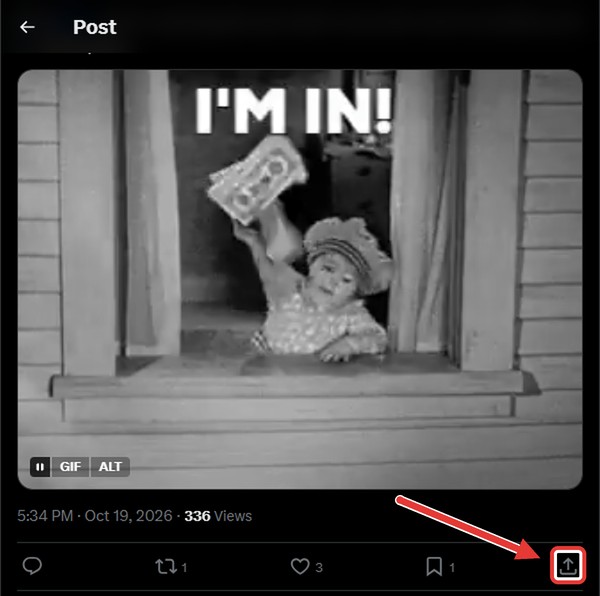
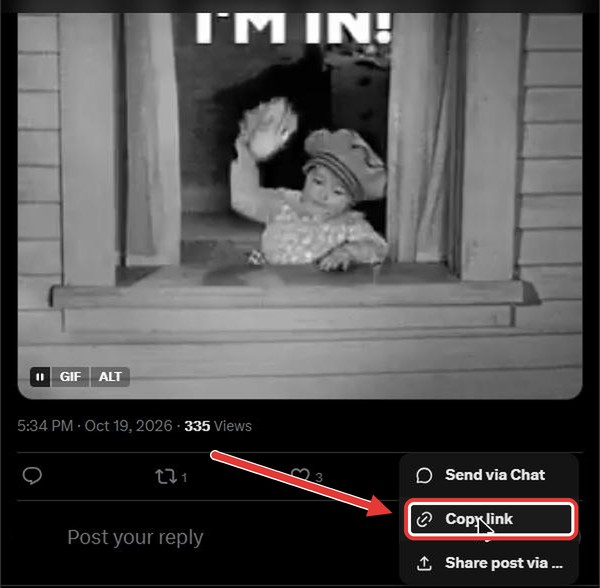
From the menu that opens, choose Copy link. On a computer you can also copy the post address straight from the browser bar.
Step 2: Paste Link
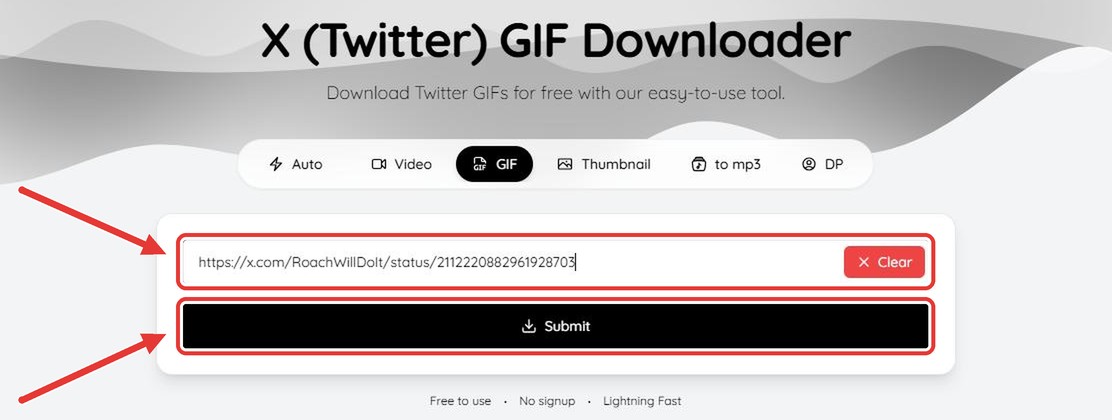
Go to the X (Twitter) GIF Downloader on SaveTools. Paste the link into the box at the top of the page and press Submit.
Step 3: Download GIF
In a few seconds your GIF is ready. The preview is marked GIF, so you know you are getting a GIF file and not a video. Press the Download button and the file saves to your device as a real .gif. If the post holds several media items, each one is listed so you can pick the GIF you want.
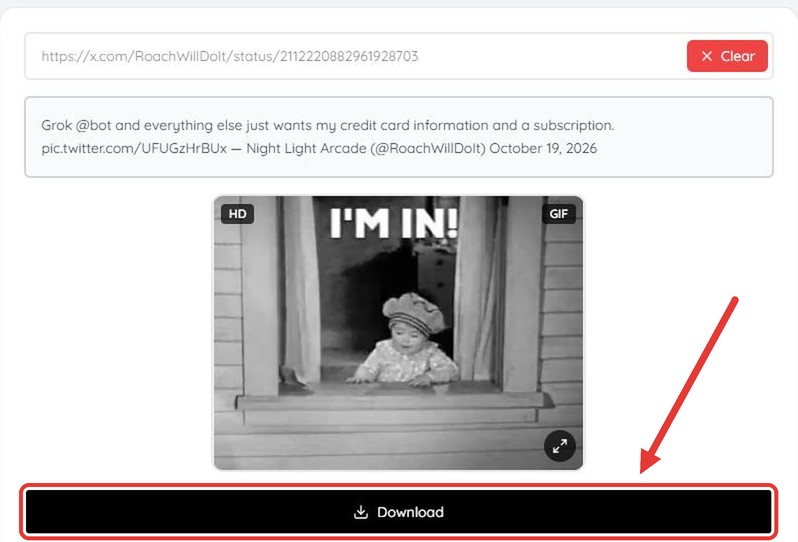
That is it. Your Twitter GIF is saved and ready to share.
How to Save Twitter GIFs on iPhone and iPad
On iPhone and iPad, use Safari or any browser to open SaveTools and follow the three steps above. After you tap download, the GIF goes to your Downloads folder in the Files app. To add it to your Photos, open the GIF in Files, tap the Share icon and choose Save Image. It keeps looping in Photos and in iMessage.
How to Save Twitter GIFs on Android
On Android, open SaveTools in Chrome or any other browser, paste the X link and tap download. The GIF is saved to your Downloads folder and shows up in your Gallery or Files app, ready to send on WhatsApp, Telegram or any other messaging app.
How to Download GIFs from X on PC or Mac
On a Windows PC or Mac, copy the post address from your browser bar, paste it into the Twitter GIF downloader and click download. The .gif file lands in your Downloads folder, ready to drop into an email, a slide deck, Discord or a forum post.
Tip: want your GIFs in their own folder? In Chrome, open Settings, go to Downloads and turn on Ask where to save each file before downloading. Chrome will then let you pick a folder every time you save a GIF.
How to Save Twitter GIFs on a Chromebook
A Chromebook works just like any other computer. Open SaveTools in Chrome, paste the X link into the X (Twitter) GIF Downloader and press Download. The GIF appears in the Downloads folder of the Files app.
To keep your GIFs safe and use them on your other devices, move them from Downloads into Google Drive (My Drive). Your GIF collection is then backed up and ready to share from your phone, tablet or computer.
Why Use SaveTools to Download X GIFs?
- Real .gif files: GIFs are converted back from video, so they work anywhere a GIF does.
- Keeps looping: the GIF loops endlessly, just like on X.
- Free and watermark free: no watermark and no limit on how many GIFs you save.
- Fast: GIFs are ready in seconds.
- No login: no X account and no sign-up needed.
- Works on all devices: mobile, tablet or computer, with no app to install.
Where Can You Use a Downloaded Twitter GIF?
Because SaveTools gives you a standard GIF file, you can use it almost anywhere: WhatsApp, iMessage, Telegram and other chats, emails, Slack, Discord, PowerPoint and Google Slides presentations, forums and blog posts. Reaction GIFs, memes and short animations are the most popular.
Tips if a GIF Will Not Download
- Use a public post. Only GIFs from public posts can be saved. GIFs from protected (private) accounts cannot be downloaded.
- Copy the post link, not the profile link. The link should point to the single post that contains the GIF.
- Check the post still exists. If the post was deleted, the GIF is gone too.
- Want sound? GIFs on X are always silent. If the post is a normal video with sound, use the X (Twitter) Video Downloader instead.
Frequently Asked Questions
How do I download a GIF from Twitter?
Copy the link of the post with the GIF, paste it into the SaveTools X (Twitter) GIF Downloader and press Submit. The GIF downloads as a .gif file.
Why does a Twitter GIF save as an MP4?
X stores every GIF as a short, silent video. Most methods save that video as it is. SaveTools converts it back into a real GIF file.
Is it free to download GIFs from X?
Yes. SaveTools is completely free, adds no watermark and has no download limit.
Do I need an X account to save a GIF?
No. You do not need to log in to X or sign up for SaveTools. Just paste the link.
Do Twitter GIFs have sound?
No. GIFs on X are always silent. For videos with sound, use the X (Twitter) Video Downloader.
Can I use the GIF on WhatsApp or in an email?
Yes. It is a normal GIF file, so it works anywhere GIFs are supported.
Can I download GIFs from a private account?
No. Only GIFs in public posts can be downloaded.
Conclusion
X does not make it easy to keep the GIFs you love, but saving them only takes three steps: copy the link, paste it into SaveTools and download your GIF. Try the free X (Twitter) GIF Downloader now and save your favourite reaction GIFs as real .gif files on any device.